Did you know nearly 8% of customers intentionally delay routine vehicle maintenance?
According to a study by IMR Inc., 7.9% of customers have postponed necessary vehicle maintenance. The most common reasons are inconvenient timing (33%) and prohibitive costs (30.3%).
If you think that’s just a communication gap, that’s not just it. It’s about lost time, lost trust, and lost revenue.
So, it’s time for a faster, clearer, and more customer-friendly approach. That’s where digital vehicle inspection software offers a smarter way forward.
DVI software lets your shop share photos, videos, and detailed reports directly with customers. This enables faster approvals, smoother communication, and stronger trust.
In this guide, we’ll walk you through what a DVI system is and what to include in your inspection process. We’ll explain how it benefits both your shop and your customers. You’ll also learn how to implement it successfully, no matter your team size or technical know-how.
So, let’s get started.
What is Digital Vehicle Inspection Software
Paper inspections are hard to read, easy to lose, and nearly impossible to explain to today’s customers. If you’ve ever had a repair order stalled because a customer didn’t understand what was wrong, you know the frustration.
A powerful DVI tool allows your technicians to complete inspections using photos, videos, and detailed notes. These are automatically turned into a professional, easy-to-understand report for your customer.
- You speed up approvals by showing instead of telling.
- You increase transparency by giving customers visual proof.
- You reduce callbacks and disputes by clearly documenting every issue.
Customers can review the condition of their vehicle, approve work instantly, and feel confident about what they’re paying for. Think of it as a smart inspection tool and a more effective way to communicate.
DVI Checklists: What Should be Included
Inconsistent digital inspections can lead to missed issues, lower repair orders, and even safety risks. That’s where structured digital checklists help. With the right setup, you’ll ensure every vehicle is inspected thoroughly, every time.
Start with the core systems
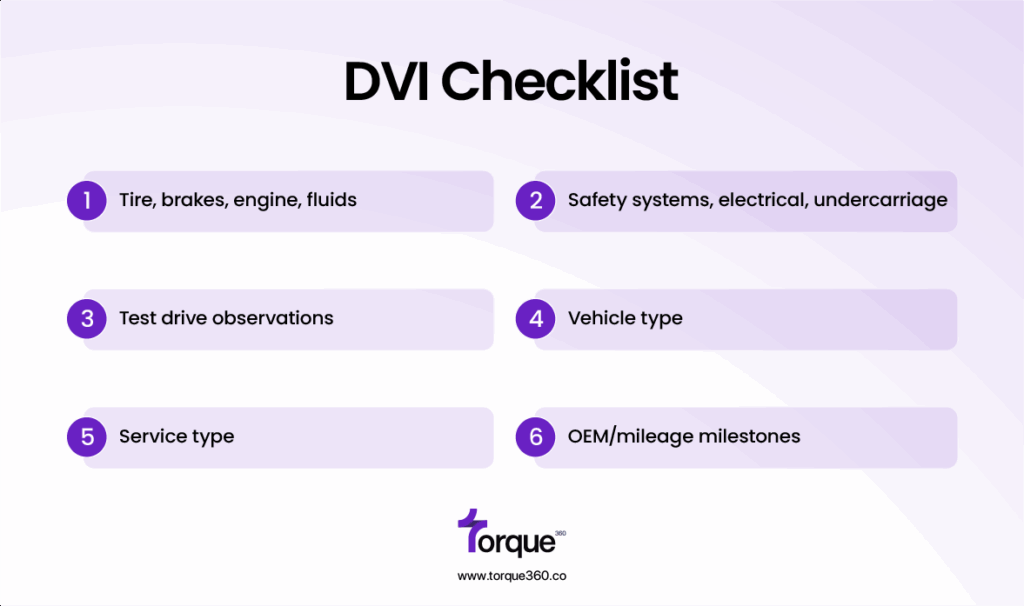
A good DVI checklist covers all the critical components that affect safety, performance, and maintenance. At a minimum, your inspections should include:
- Tires, brakes, engine, fluids
- Safety systems, electrical, undercarriage
- Test drive observations
These aren’t just technical boxes to tick; they’re conversation starters with your customers. When you show them photos of worn brake pads or low fluids, they see the value. You don’t even need to sell it to them.
Customize by vehicle & service type
Not every inspection needs to be the same, nor should it be. With DVI software, you can customize your checklists based on:
- Vehicle type: Cars, trucks, EVs, hybrids, commercial fleets
- Service type: Routine maintenance, diagnostics, seasonal checks
- OEM/mileage milestones: Customize based on manufacturer guidelines or service intervals
This kind of flexibility ensures inspections are relevant, accurate, and fast. It saves your techs’ time while giving customers exactly what they need to know.
Results are more consistent inspections, better communication, and higher-quality service across your shop.
5 Key Benefits of Using DVI Inspection for Auto Repair Shops
The delay between finding a problem and getting customer approval could be costing your shop more than you think. It affects your time, money, and trust.
DVIs solve that by removing friction from the inspection-to-approval process. Along with key features that simplify communication and workflow, they deliver real, measurable value to your shop.
1. Faster job approvals
Delays in getting customer approval slow down your shop’s productivity and revenue flow. With DVI software, you can instantly send detailed inspection reports. These reports include photos and videos and go directly to customers’ phones or emails. This immediate transparency allows customers to quickly understand the needed repairs. They can approve jobs from anywhere, reducing downtime and accelerating your workflow.
2. Higher average repair orders (AROs)
Customers are more likely to approve additional services when they see clear, visual evidence of issues. DVI reports provide undeniable proof of the vehicle’s condition, increasing trust and confidence. This transparency helps turn tentative “maybes” into firm approvals, resulting in larger repair orders and higher shop revenue.
3. Reduced miscommunication
Handwritten notes are not professional. They are messy and can be easily misunderstood by the customer due to illegible handwriting. Moreover, there’s no way to actually add a visual record in manual notes. However, DVIs keep everything documented, visual, and clear. Advisors know exactly what’s wrong and how to present it. You have the proof in the form of videos and photos. Technicians attach the files to the report for future reference.
4. Improved technician accountability
A standardized digital checklist, combined with mandatory photo or video evidence, promotes consistency and thoroughness. This accountability reduces the chance of missed issues and shortcuts, leading to fewer callbacks and customer complaints. It fosters a culture of quality work, with clear documentation that protects both the shop and the technicians.
5. Better customer retention
Transparency and professionalism build customer trust. When customers can see exactly what’s wrong and why repairs are necessary, they feel confident. This should be done without confusing jargon or pressure to encourage them to return for future services. This trust, built through clear digital inspections, creates long-term loyalty and helps your shop maintain a steady flow of repeat business.
4 Key Benefits of Using DVI for Customers
Uncertainty leads to frustration, hesitation, and sometimes distrust, which can make customers delay necessary repairs or shop elsewhere.
Digital vehicle inspections change the situation by giving your customers clear, visual insights into their vehicle’s condition. They can view these insights right from their phone or email.
1. Visual proof builds transparency & trust
Instead of relying on confusing jargon or verbal explanations, customers see photos and videos of the exact issues. This transparency makes them feel confident and informed.
2. Clearer understanding of repairs
Detailed digital vehicle report explains what’s wrong, why it matters, and what the next steps are, in simple language. Customers get peace of mind knowing exactly what’s happening with their vehicle. Thanks to the transparency built into how DVI software works behind the scenes.
3. Convenient digital communication
Customers can review inspection reports anytime, anywhere on their phones, tablets, or computers. They can approve repairs remotely without interrupting their day.
4. Confidence in repair decisions
Knowing exactly what’s needed and seeing proof helps customers make informed choices without feeling pressured. They’re more likely to approve necessary work and return for future service.
5 Core Features to Look for in a Vehicle Inspection Software
Focusing on these 5 key features will help you pick a tool that truly boosts your shop’s efficiency. It will also improve customer satisfaction.
1. Photo & video capture
Words can only describe so much. The ability to take photos or videos during inspections and mark specific issues gives your customers undeniable visual proof.
This feature prevents confusion, builds transparency, and helps customers understand exactly what repairs are needed and why. Visuals also help your advisors explain repairs clearly, improving approval rates and reducing disputes.
2. Canned jobs and parts/labor
Canned jobs are pre-set inspection points or repair tasks. They can be quickly added to an inspection or estimate without manual entry every time. Linking parts and labor directly to inspection findings simplifies the repair order creation process.
It also reduces administrative errors and speeds up billing. This smooth workflow keeps your shop moving efficiently and minimizes back-and-forth between departments.
3. Color-coded urgency system
A color-coded system that categorizes inspection findings into urgent, recommended, or future maintenance helps customers prioritize without confusing them.
Highlighting immediate safety issues in red, for example, draws attention. Softer colors can be used for less urgent suggestions.
This clear visual hierarchy helps customers make informed decisions and reduces the chance of “repair shock.” It also improves your chances of upselling recommended services.
4. Digital authorization & customer messaging
The faster a customer can approve needed work, the faster your shop can get to work. Digital authorization allows customers to review and approve repairs directly from their phone or email.
Additionally, built-in messaging features let your service advisors answer questions, clarify concerns, or offer alternatives without losing time. This real-time communication boosts customer satisfaction and keeps your workflow smooth.
5. DVI history & declined job tracking
Keeping a clear record of past inspections, repairs performed, and any declined services is critical. It helps ensure accountability and builds customer trust. A good DVI system tracks inspection history and notes when customers decline recommended work.
This data helps your advisors follow up on previously recommended repairs and provides liability protection. It also offers customers transparency on their vehicle’s maintenance timeline.
How to Implement the DVI Automobile System
Switching to DVI might feel like a big leap. With the right approach, you can make the transition smooth and effective. This will set your shop up for success from day one, especially when guided by proven implementation strategies.
Step 1: What shops need before implementing
Before rolling out the DVI tool, ensure your shop has:
- Reliable devices for technicians to easily complete inspections on the shop floor.
- Stable internet connection to sync reports in real-time and communicate instantly with customers.
- A clear inspection process and standardized checklists that techs can follow consistently.
Step 2: Best practices for rollout
Start small and scale up:
- Pilot with a small team or train a handful of technicians and advisors first. Gather feedback, fix issues, and refine workflows.
- Set clear expectations and communicate benefits and goals to your entire team to build buy-in and reduce resistance.
- Monitor approval times, repair order increases, and customer feedback to measure success.
Step 3: Training technicians & advisors
Your technicians and service advisors are the face of the new system. Their comfort with the automotive digital inspection software determines your success.
- Provide hands-on training focused on the interface, photo/video capture, and checklist customization.
- Emphasize how DVIs reduce repetitive calls and improve customer trust, making their jobs easier.
- Train advisors on interpreting reports and using digital communication tools to engage customers promptly.
Step 4: Tips for customer education
Customers may be unfamiliar with inspections at first, so help them understand the value:
- Introduce DVIs as part of your standard service experience. Highlight transparency, convenience, and speed.
- Share example reports during drop-off or via email to show what they can expect.
- Encourage customers to ask questions and approve repairs digitally to save time.
Why Customers Use Toque360 for DVI
When it comes to automotive digital inspection, you want a solution that fits smoothly into your daily operations. It should also help build trust with your customers.
Toque360 is an all-in-one shop repair management software designed to resolve the daily challenges a shop faces in operations, repair orders, estimates, and inspections, etc.
1. All-in-one platform advantage
Instead of handling multiple tools, Toque360 combines digital inspections, repair orders, and customer communication into a single platform. This integration saves you time, reduces errors, and keeps everything organized.
2. Smooth integration with shop operations
Toque360 works alongside your existing systems and processes without disruption. It scales with your needs, helping your team adopt vehicle inspection technology quickly and effectively.
3. Scalable for growing teams
As your business grows, Toque360 grows with you. Add more technicians or advisors without sacrificing speed or usability. This scalability means your investment continues to pay off as your shop expands.
4. Designed for transparency & tech adoption
Toque360 prioritizes clear communication between your techs and customers. With easy photo/video sharing, digital approvals, and real-time messaging, customers feel confident and informed. They can make repair decisions easier and faster.
Modern Vehicle Inspections Boost Inspection Efficiency
Vehicle inspection tools are now considered an ultimate part of the inspection process. With DVI software, you can turn what used to be a slow process into a transparent experience.
By adopting digital vehicle inspection software, your shop gains quicker approvals, higher repair order values, and better technician accountability. You give your customers clear, visual proof they can trust.
This modern approach simplifies your workflow. It also strengthens the relationship you build with every vehicle owner who walks through your door.
Torque360 offers a smooth, scalable platform designed to help your shop embrace the future of inspections. It enhances efficiency, builds loyalty, and drives growth.
Frequently Asked Questions
What is the most important reason for vehicle inspection?
The most important reason for vehicle inspection is to ensure safety, performance, and reliability. A thorough inspection helps identify issues before they become major problems, keeping both the vehicle and driver safe. With digital vehicle inspection (DVI) software, shops can spot critical issues faster and communicate them clearly. This leads to quicker approvals and better outcomes for both the business and the customer.
What is the main objective of inspection?
The main objective of an inspection is to assess the condition of a vehicle and identify any necessary maintenance or repairs. DVI tools enhance this process by documenting findings with photos, videos, and notes. This makes it easier for both technicians and customers to understand what needs to be done and why. It’s not just about checking boxes; it’s about building transparency, trust, and timely action.
What makes a good inspection?
A good inspection is thorough, consistent, and easy to understand. It should cover all critical systems, including brakes, tires, fluids, and safety components. The checklist should also be customized based on the vehicle type and the specific service being performed. With DVI software, good inspections also include visual proof and clear documentation, ensuring nothing is missed and customers are fully informed.